


▶ 3:12 / 14:02 · "the COMPLETE guide to excel views (2019)"
search & tutorials
ten tabs and a 14-minute video for a four-second answer, about a menu that moved two versions ago. then you still can't find it.
15+ minutes, every time
psst… everything here moves. drag it, double-click the folders.

 HeyNavi–□✕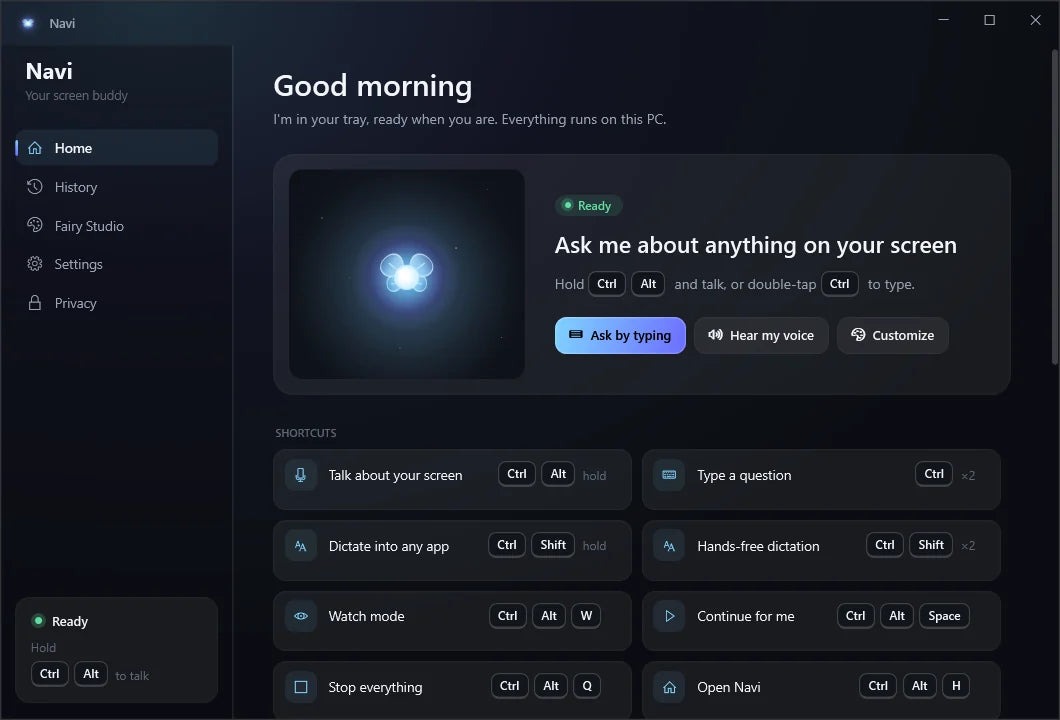



it sees your screen and shows you where to click. on windows and mac.
pay once, own it for good. no subscription, no account.
it looks, talks, and points.
early bird price ends in
00hrs00min00seceverything included
the feature you need is always three menus deep. getting unstuck today costs you one of three things.
ten tabs and a 14-minute video for a four-second answer, about a menu that moved two versions ago. then you still can't find it.
15+ minutes, every timescreenshot, crop, upload, explain. they can't see your screen, can't point at anything, and they keep a copy of what you sent.
~$20/month + your privacyinterrupt a coworker, file an IT ticket, or call family again, then wait for someone to reply. it works eventually, just slowly.
time, patience, favorspick an app and watch the whole loop: hold the keys, ask out loud, hear the answer, and the guide flies to each control in order.
a chime plays and HeyNavi listens, only while you hold them.
talk like you would to a person. it hears you on your machine.
short, clear steps with live captions. press again to stop it.
the guide flies to the control and rings it. click, and done.
patient, quick, and it never makes you feel silly for asking where the button is.

ask where something is and a guide of light flies to the exact control and rings it.

hold two keys and ask out loud. it answers in a natural voice, with live captions.

say "do it" and it clicks and types for you. hit stop anytime to take back control.

sending, deleting, paying or quitting always waits for your real click, every time.

it reads the monitor your cursor is on and handles any scaling, so it lands exactly.

four styles and seven colors. pick the guide you want flying around your screen.
dictate into email, documents, chat, and code. hold ctrl shift, talk, release, and the words are there.
every time you ask, HeyNavi chains five systems, each tuned for one job. they run on your own computer, and the first sentence is playing before you'd have finished typing a search.
// competent on day oneCRMs, finance tools and design suites. ask HeyNavi instead of asking a coworker.
// one key to rememberpatient, spoken help with a glowing pointer, so you get fewer "how do i…?" calls.
// stay in flowphoto, video and 3D apps have hundreds of panels. ask for the one you need.
// nothing leaves the buildingclient files and records stay on the computer, because HeyNavi runs locally.
// talk at 150 wpmdictate straight into any app at the speed you talk, with no meter running.
// your GPU, finally usefulyou bought serious hardware. HeyNavi puts it to work all day, right on your PC.
HeyNavi works completely offline. already pay for Claude, Codex, Kimi or OpenCode? plug it in with one click and HeyNavi can think with it too.
try it: this is how it looks in HeyNavi's settings. just a demo, nothing is sent.
same question, two ways to get unstuck.
HeyNavihold, ask out loud, and it points to the exact button.
HeyNavi works on any windows PC or mac. no graphics card needed.
connect an AI you already use. no special hardware.
runs entirely on your computer. the minimum:
faster with NVIDIA RTX or Apple silicon.

I used to waste time searching for buttons in unfamiliar apps. HeyNavi pointing things out on my screen makes learning new software feel less tedious.

The voice feature is handy when I'm stuck in a menu. I can ask a quick question and keep working without breaking my focus to search through my guide.

I like that it shows me where to click instead of giving me a wall of text. It feels more like having a patient coworker help me to figure things out.

Bought it mainly for help with spreadsheets, but I keep finding other uses. Having guidance right on the screen makes unfamiliar tools less confusing.

The offline setup was what caught my attention. I wanted help using my apps without constantly sending my screen elsewhere, and this fits those needs.

I'm usually the person asking someone where a setting is. Having a handy guide beside me makes it easier to try things myself and learn as I go along.
what to know about HeyNavi, privacy, and getting started.
an AI guide for your computer. hold ctrl + alt (control + option on a mac) and ask about anything on your screen. HeyNavi answers out loud, and a glowing fairy flies to the exact button you need. ask it to, and it'll do the clicks for you. it works completely offline, or it can think with an AI you already use.
yes. HeyNavi runs on windows 10 & 11 PCs and on macs with macOS 13 or later. one purchase covers both, so download the version for your computer from this page.
no. HeyNavi runs on any windows 10 or 11 PC or mac. with an NVIDIA RTX card it thinks offline in about a second. on other computers it uses a smaller offline brain, or an AI you already use.
no. the screen and microphone are captured only while you hold a shortcut, after you open the typed-question box, or if you turn on watch mode yourself. there's no wake word and no background recording. the screen frame is deleted after every answer, and audio is never written to disk.
HeyNavi's AI runs on your own computer, and nothing is uploaded by default. there's no account, no login, and no telemetry, and logs never contain what you said. if you choose to plug in your own AI, only your question and the app's text are sent.
yes. after the one-time download, hearing, vision, voice and pointing all run on your computer, with no account, no API keys and no telemetry. it keeps working with no internet connection.
yes, if you want. Settings → Brain → Connect opens that service's sign-in page in your browser, and HeyNavi never sees your password. only your question and the app's text are sent, and screenshots stay on your computer unless you turn that on. switch it off any time to go back to fully offline. see how it works.
anything you can see: browsers, office suites, design tools, settings, and line-of-business software. it combines the app's own layout information with what's on screen to find the right control. no plugins or integrations needed.
fully supported. HeyNavi reads the monitor your cursor is on and handles 125%, 150%, and 200% scaling, so the guide lands on the exact spot.
yes. ask it to do something and it clicks and types for you. before anything that sends, deletes, pays, or quits, it stops and waits for your real click. it never clicks through admin, password, or purchase prompts.
yes. HeyNavi runs on any windows 10 or 11 PC and any mac on macOS 13 or later. connect an AI you already use, or run it fully offline with 8 GB of RAM and about 3 GB free. see requirements.
about 1.7 seconds from releasing the keys to hearing the answer, with the offline brain on a fast NVIDIA graphics card. other computers take a few seconds, and with your own AI it's typically 3 to 4 seconds.
$78, once, during the early bird (70% off the regular $260 price). there's no subscription and no credits, and every v1 update is included. it covers your own computers for personal and work use.
everyone has googled a button.
you know what you want to do. you just can't find where the software hid it. three menus deep, behind a gear icon, renamed in the last update.
so you open ten tabs, scrub through a 14-minute video, and lose your train of thought.
we built HeyNavi to show you where to click instead of describing it. ask out loud, hear the answer, and watch a little light fly to the exact spot.
and because nobody should have to switch computers to get help, it works on windows and mac.
try it and tell us what you think.

$260 $78
once. no subscription, no account, every v1 update included.

